Try Different Durations
- 01What is this Punjabi Typing Test?
- 02How to Use the Punjabi Typing Test?
- 03Why Practice with This Tool?
- 04Types of Punjabi Typing
- 05Set Up Keyboard & System
- 06Master Finger Placement
- 07Utilize Free Online Tools
- 08Daily Practice Routine
- 09Pro Tips for Speed & Accuracy
- 10Frequently Asked Questions (FAQs)
- 11Conclusion
What is this Punjabi Typing Test?
This Punjabi typing test uses “Gurmukhi Font” (Raavi font), which is widely required in Punjab state recruitment exams conducted by the PSSSB Official Portal. The user can check their Punjabi typing speed and accuracy. We provide two modes: practice mode and exam mode. In practice mode, the user can see their live speed (WPM), error percentage, backspace number, live word, and timing. In exam mode, users see only the timer and rest parameters shown after the user submits the test.
This is a Punjabi typing test platform-independent and works seamlessly across Windows, Mac, Linux, Android, and iOS devices. It takes the user's OS keyboard input to type.
How to use the Punjabi Typing Test?
- Select Test Duration
- Choose from: 2 minutes, 5 minutes, 10 minutes, or 15 minutes.
- Duration can be changed before starting the test.
- Select Exam Mode
- Choose the test mode you want.
- Practice mode for live view.
- Exam mode to test your skills.
- Live Metrics Displayed
- Time Left: Countdown timer (MM: SS format).
- WPM (Words Per Minute): Current typing speed.
- Accuracy: Percentage of correct keystrokes.
- Backspace: Number of Backspace keys you pressed.
- Final Results Include
- Net WPM: Speed after deducting errors.
- Gross WPM: Raw typing speed
- Accuracy: Overall correctness percentage
- Errors: Total number of mistakes
Why Practice with Our Punjabi Typing Test Tool?
We designed this platform to help you in typing tests with the Raavi font to build muscle memory and improve typing speed. Take a full-length 10 Minute Typing Testsession and read our Touch Typing Guideto master correct key positioning. There are 50+ tests available in practice and exam mode, where you can take your test and know about your Punjabi typing skills.
How Many Types of Punjabi Typing Are There?
To type Punjabi, typing can be done in two ways.
Phonetic typing-
In this typing, words are not written directly in the Punjabi language but are based on Pinglish patterns. As the name suggests, Pinglish is a combination of the words Punjab and English. By using this pattern, you type in English rather than directly in Punjabi, yet the words appear in the Punjabi script.
For example, if you write Waheguru, it appears as ਵਾਹਿਗੁਰੂ.
For Punjabi typing, typing can be done in this manner in the beginning, and this method of typing is better for your personal use & social media use. But this method is not valid in competitive examinations; for exams, it is done in the manner given below.
Ravi/Anmollipi/inscript Font -
This uses a traditional keyboard layout. It uses the Inscript layout. Punjabi is typed in Gurmukhi script. In the examinations held in Punjab and Haryana, official typing is done on this pattern, in which one has to type without looking at the keyboard.
In my personal opinion, if you are looking for a job, you should learn typing in this layout.
Set Up Your Keyboard Layout & System
To set up Punjabi language typing on mobile, we need a typing keyboard with Gurmukhi Unicode.
For this, we install Google Gboard or Desh Punjabi Keyboard, etc., on our mobile phone.
After this, you have to press the settings button of the downloaded keyboard. Go to the settings button and select the language on the keyboard. For this, you will select the Punjabi-QWERTY keyboard. Now your mobile is ready for typing in the Punjabi language. Apart from this, you can also choose the Pinglish language in the language settings of the keyboard. with this option, you type using English characters, but the output appears in Punjabi.
Now, let's talk about the computer. So, we have already told you above that for official work, you have to practice typing in Inscript layouts on the computer. For this layout, you have to do the following process of settings on your computer.
Go inside the settings by clicking on the computer settings option.
Here you have to click on the option of language and region.
Search for the Punjabi language in it and download it and install it on your computer.
After the Punjabi language is downloaded,
Click on the Punjabi language option and set Punjabi Inscript.
Now your Punjabi language setup is ready.
To use it while typing, press either 'Windows + Spacebar' or 'Alt + Shift'.
Master Finger Placement
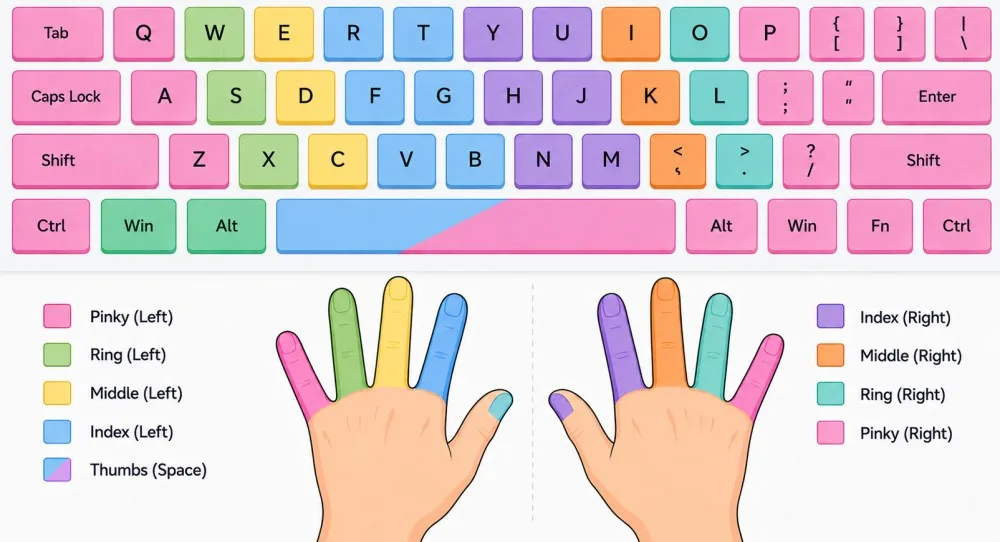
It is important to memorize the keyboard's inscribed keys for correct finger positioning. To identify the specific locations of Punjabi keys on the keyboard, download the Punjabi Inscript/Ravi font keyboard, print it out, and keep it in front of you to visualize.
It is very important to have a good understanding of the home Row. Position of your left hand fingers on
ASDF buttons and of right hand fingers on JKL buttons simultaneously.
Your thumb must be on the space bar button.
All the Weight of your palm/hand should not be totally on the keyboard.
Layout basics
To understand the basics of the layout, from my experience, I highly recommend visualizing a printed keyboard's keys for Punjabi letters. After visualising, it is very easy to remember the location of letters(painti akhri/ਪੇਂਟੀ ਅਖਰੀ).
For this, in one part of the keyboard there are vowels, in one part there are consonants, in one part there are matras. This is done so that you can easily reach the latest.
If you remember this part while typing, typing will be easier, and keep in mind all the key maps of Punjabi characters.
Utilize Free Online Tools
Nowadays, free tools are available on the internet to learn Punjabi typing.
Through these tools, you can learn and practice Punjabi typing. These tools can also be used to increase typing speed.
Punjabi typing can be learned in an interesting way through online games.
You can also continue your Punjabi typing journey by visiting our website freetypingtest. in.
Follow a Daily Practice Routine
To learn Punjabi typing, you need to make a daily routine. A daily routine is provided below. According to me, you can learn Punjabi typing in 3 weeks. For this, make a rule of typing for 25 to 30 minutes every day and never break it. vnow
Day 1 to Day 5
In the initial days, just practice characters of the Punjabi alphabet. You need to practice typing the alphabet for five days. For the first one or two days, you will face difficulty in typing Punjabi characters on the keyboard, but later, by the fifth day, you will develop a good understanding of typing vowels.
Day 6 to Day 10
After practicing the characters, you now need to learn how to type *matras* /vowels. Keep the map of keyboard in front of your eyes and practice *matras* to type daily 25-30 minutes for five days till the end of this period, you will have gained a solid grasp on it.
Now coming to your evaluation, you have now learned Punjabi characters(ਨਰਸਿੰਗ ਹੋਮ).
Day 11 to Day 18
In these days, learn to type words by combining letters and diacritics. Practice this exercise for a given period.
Day 19 to Day 21
Now, it is time for the final preparation. In this timeframe, you should upgrade your level from small words to sentences. And practice typing these Punjabi sentences for 3 days.
By following the daily routine given above, you can learn Punjabi typing.
Pro Tips to Boost Speed and Accuracy
If we talk about increasing speed, then first we have to increase our typing accuracy.
You have to work on accuracy for 10 to 15 days. For this, you have to practice daily. When the accuracy becomes stable, then the speed will automatically start increasing.
While typing Punjabi, do not look at the keyboard at all. In the time you spend looking at the keyboard, you can write one or two extra words. Avoiding this bad habit helps boost your speed.
Read the newspaper(Ajit, Jagbani, etc.) of your state, Punjab, and type the passage by looking at it. And do not make a habit of using the backspace button while typing.
Take free online mock tests to test your typing speed. In this, you get your live report, and by analyzing the report, you can improve your mistakes and practice typing, which increases your speed.
To measure your typing speed, you can visit the freetypingtest website and take daily Punjabi typing mock tests.
Frequently Asked Questions (FAQs)
Q1: How long does it take to achieve 30 WPM typing speed?
With dedicated daily practice of 45-60 minutes, most beginners can achieve 25-30 WPM within 2-3 months.
Q2: Can I use both thumbs for the spacebar?
Yes, using either thumb for the spacebar is acceptable.
Q3: Should I memorize the entire keyboard layout before starting practice?
No, start typing simple words/sentences immediately. Actual typing practice is more effective to learn.
Conclusion
We provide you Punjabi Typing tests with the Raavi font, where you can check your Punjabi typing skill or start your practice journey. Follow our structured guide on How to Learn Typing in 30 Daysto reach target speed rapidly. If you are preparing for any Punjabi typing test, this will help you.
About the Author