Everyone wants to type fast, but if you are looking at the keyboard keys, then maybe you are unable to reach your true typing speed potential. If you just start learning to type, it's okay to look at the keys at first; even when I started typing, I looked at the keys on the keyboard. Over time you have to learn touch typing, this is easy (also see our 30-day complete typing plan). Whether preparing for government exams like SSC CGL DEST or improving daily work speed, this article will guide you to master touch typing.
What is Touch Typing
In simple words, “Typing without looking at the keyboard keys with the correct finger placement on a standard QWERTY keyboard layoutis called touch typing.”
So, in touch typing, we have to focus on the screen, and our right and left hand fingers are placed correctly on the keyboard home row.
How to Learn Touch Typing
Honestly, learning touch typing takes some time. You have to do typing practice. When I was learning touch typing, sometimes I looked at the keys at first, but over time I developed muscle memory. If you start typing, you might also face a similar problem, but I am here to guide you to learn touch typing.
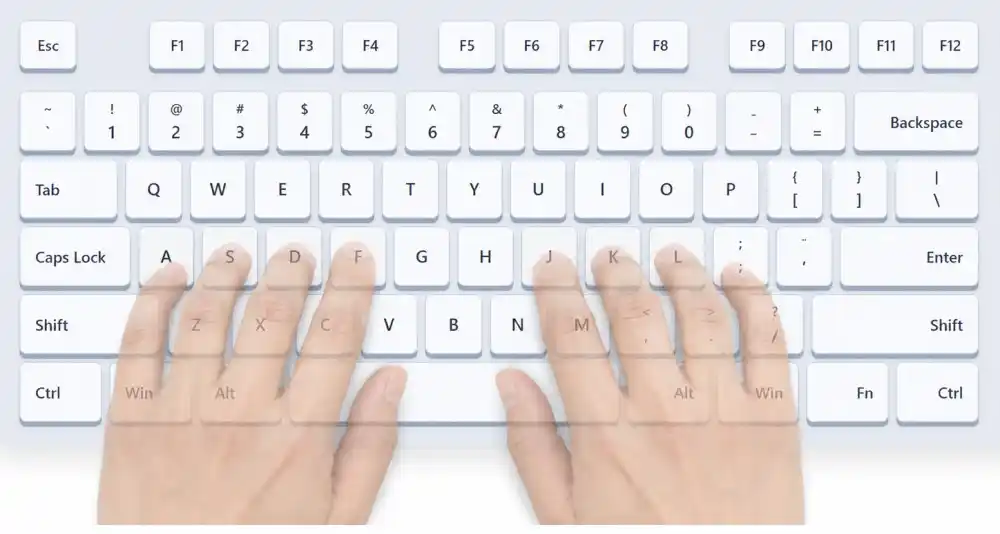
- Finger placement at the home row of the keyboard contains keys (A S D F G H J K L ;). Your left-hand fingers are on ( A S D F ), and your right-hand fingers are on ( J K L ; ), as shown in the figure.
- After you get used to the home row, try to learn the top and bottom rows. After pressing the keys in the top or bottom rows, your fingers must return to the home row placement.
- The top row of the keyboard contains (Q W E R T Y U I O P ) keys, and the bottom row contains (Z X C V B N M). Make sure you are using the correct finger to press the nearest key.
- When you learn these rows, now learn the number row, symbols, and punctuation typing.
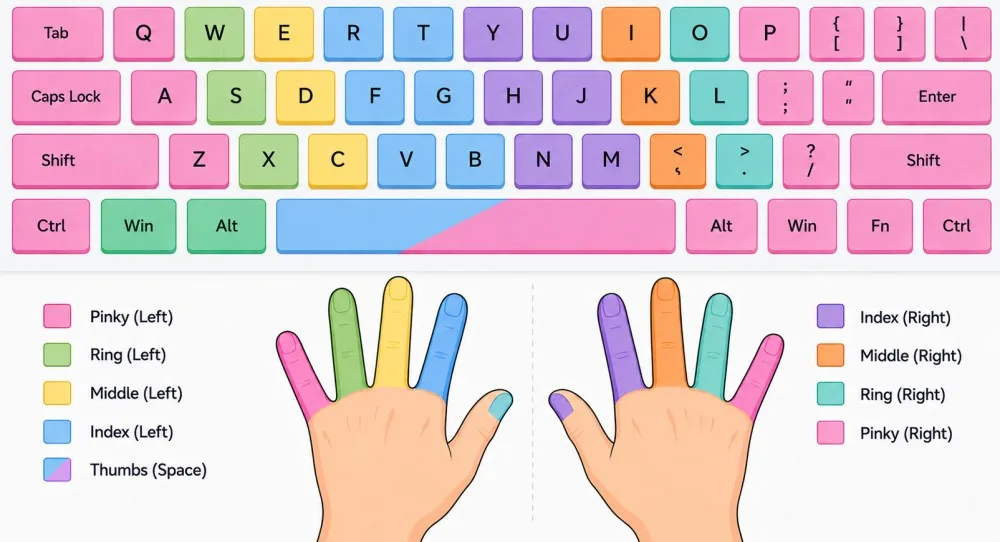
Here is the list of fingers and their corresponding keys:
- Left Pinky:1, Q, A, Z, Left Shift, Tab, Ctrl
- Left Ring Finger:2, W, S, X
- Left Middle Finger:3, E, D, C
- Left Index Finger:4, 5, R, T, F, G, V, B
- Thumbs:Spacebar (either thumb can press it, typically the dominant hand's thumb)
- Right Index Finger:6, 7, Y, U, H, J, N, M
- Right Middle Finger:8, I, K, , (comma)
- Right Ring Finger:9, O, L, . (period)
- Right Pinky:0, -,=, P, [, ], ;, ', /, Right Shift, Enter, Backspace
Practice Touch Typing and Avoid Common Mistakes
For the muscle memory you have to do typing practice. We provide 5, 10, and 15 minute typing practice sets. Start from the 5-minute typing testpractice. Practice makes you perfect. Everyone starts with zero, but with time, you build muscle memory.
Your sitting posture is also important; make sure you sit properly. Avoid hard pressing the keys.
Conclusion
With the practice, you achieve touch typing, and you do not need to look at the keyboard again and again.
About the Author