- 01Why Choose a 5 Minute Typing Test?
- 02Why Freetypingtest.in 5-Minute Typing Test is Best
- 03How to Participate in This 5-Minute Typing Test
- 04Real-Time Stats Displayed During Your 5-minute Test
- 05Who Should Take a 5 Minute Typing Test?
- 06Why Accuracy Matters More Than Speed
- 07Frequently Asked Questions
- 08Conclusion
Take our free online 5-minute typing test to measure your typing speed (WPM)and accuracy. Taking the test with 100 plus 5-minute typing practice paragraph will give you your sustained WPM and real-life typing result.
Why Choose a 5 Minute Typing Test?
When I do a typing test for a short duration, I get a higher WPM compared to the long duration test, may be you are also experiencing the same. That’s why the 5-minute typing test is important to measure sustained WPM. Our 5-minute typing test helps you to improve.
- Improve WPM speed.
- Consistent typing speed
- Finger endurance
- Accuracy under continuous typing
- Create muscle memory
If you are starting to learn typing, taking this test will definitely help you.
Why Freetypingtest.in 5-Minute Typing Test is Best
Hi, I designed this platform in a way user get the value of their time, no matter whether you just start typing or you are a pro; the difficulty modes exist for fot both of you. You can practice here with 100+ typing paragraphs. We provide a detailed analysis report that helps you understand your weaknesses. Here are some of the best points why we are the best.
- 100+ practice paragraphs in each difficulty mode
- Difficulty mode option
- Live performance updated
- Your typing speed vs time graph
- Side-by-side result comparison
- Your slowest key pressing detailed.
- Personalised recommendation
- 100% free, no login required
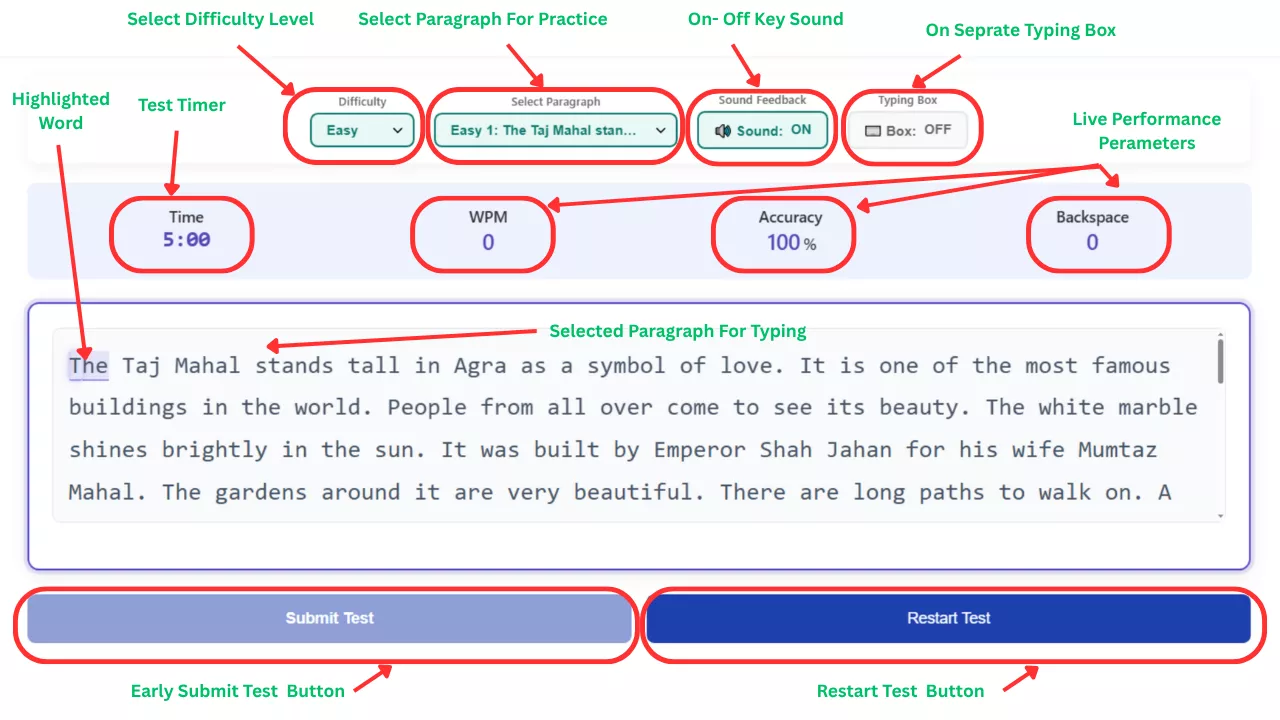
How to Participate in This 5-Minute Typing Test
We provide an option so that the user can select the 5-minute test setting according to the his prefrence
1. Select Difficulty Level
- Easy
- Medium
- Hard
2. Choose Paragraph for typing Practice
The default is to show any paragraph, but you can select from the 100+ 5-minute test paragraphs so that you will get unseen passages.
3. Audio & Sound Feedback
You can turn the sound on and off.
4. Flexible Typing Box Layout
If you want, you can type separately in the typing box by clicking on this.
Real-Time Stats Displayed During Your 5-minute Test
Above the paragraph, there are live typing performance parameters so the user will get live feedback of their performance, which is important if you are just starting to learn typing. The live parameters are
- Countdown Timer
- Live WPM
- Accuracy percentage
- Backspace Count
Who Should Take a 5 Minute Typing Test?
From my perspective, this typing test for 5 minutes is useful for everyone.
Students- you can improve your typing speed for school/collage assignments, online exams, and research work.
Government typing tests- This test will help you in your competitive exam practicejourney.
Office Professionals- You can increase productivity by typing fast reports, emails, and documentation.
Writers and Bloggers- Faster typing takes less time, and with more time, you can write more blogs.
Programmers- Typing fast with accuracy is needed for programmers.
Freelancers- Content writers and data entry professionals will increase their efficiency.
Why Accuracy Matters More Than Speed
When you start your typing journey, you type as fast as possible. By this approach, if you are making mistakes, then you have to change your approach because in almost all typing tests, the net WPMis measured. Gross WPM calculation uses the total number of characters typed: 5 characters=1 word, but Net WPM subtracts typing errors from your gross speed.
So focus more on accuracy and net WPM.
Frequently Asked Questions
What is a good WPM score for a 5-minute typing test?
35 WPM with 95%+ accuracy is a good score for speed; you know, in most of the typing exams, approx 35 WPM is required.
How many times should I practice this test daily?
I want you to take 3 to 5 practice sets daily with a 5-minute typing practice duration.
Why is Net WPM more important than Gross WPM?
In gross WPM, the mistakes are ignored, but in net WPM, errors incur a penalty. Official typing tests mostly count net WPM, so you should focus on that.
Conclusion
Improve your typing skill with our free 5-minute online typing test. With the detailed typing analysis report, you are able to pinpoint where you need to practice extra for improvement. Always remember, practice makes a men/women perfect, so keep practicing daily with our free typing testswith consistency. You have to aim for 95%+ accuracy and 35+ WPM.
About the Author