Why our 15-minute Typing Test is Best & Unique
We provide a 15-minute typing test, with three difficulty modes, and each mode has 100+ practice paragraphs. It's best for your typing practice.
While most government typing examinations (i.e., SSC CGL, SSC CHSL, RRB NTPC) typically use a ten (10) minute duration for their respective typing tests, having your 15 (minimum 15) minute test completed will ensure you are able to comfortably exceed these requirements.
This freetypingtest.in platform provides, You Performance Summary Cards that contain Net WPM, Accuracy, Gross WPM, Mistakes, Full Errors, Half Errors, Total Keystrokes, Backspaces, CPM (Characters Per Minute), Speed Over Time Chart, Slowest Keys Analysis, Personalized Recommendations, and Side-by-Side Text Comparison. This makes this platform unique and useful for professional typing skill assessment and government typing exam preparation.
How to Participate in This Typing Test
Settings: You will have complete control over your typing test environment before starting.
Levels of Difficulty
You can choose from three different difficulty levels: easy, medium, or hard, based upon your level of proficiency.
Paragraph Selection
We provide 100+ paragraphs in each difficulty mode. You can select a random paragraph or a specific paragraph number if you wish to practice that same text repeatedly.
Sound Feedback
You can toggle sound feedback on or off. When enabled, it provides an auditory click sound for every key pressed, assisting you in keeping a rhythmic pace.
Typing Box Layout
Toggle the separate typing box layout depending on your personal preference. You can choose to type directly within the highlighted text box or use a separate dedicated typing input area.
Real-Time Stats Displayed
During the typing test, five key metrics are shown at the top of your screen:
Countdown Timer
When you have approximately 10 seconds remaining in your test, the countdown timer will change to red, and begins to pulse to remind you to finish strong.
WPM (Words Per Minute)
Your current Words Per Minute speed, so you can see you're typing speeding live.
Accuracy
The accuracy rating indicates your accuracy in terms of percentage. If you see this number decrease, you may want to slow down and concentrate on typing accurately.
Backspace Count
The total number of times you have used the backspace key to correct your errors.
Who Should Take the 15 Minute Typing Test?
Those Preparing for SSC or Government Examination
Candidates preparing for SSC CGL(read our SSC CGL guide), SSC CHSL(read our SSC CHSL guide), or RRB NTPC(read our RRB NTPC guide) with 10-minute typing sections should train for 15 minutes. For official notifications, check the Staff Selection Commission (SSC) official websiteand the Indian Railways Portal.
Those in Banking and Insurance
Whether you are taking the IBPS, SBI Clerk, RBIV, LIC or some other position in banking, typically you will have a typing requirement for that position. To demonstrate to banks that you exceed the minimum typing requirement and thus increase your chance to be hired in your desired field.
Transcriptionists
Medical, Legal or General transcriptionists complete their work in focused 15-30 minute intervals. The 15-minute typing test will give you an accurate indication of your level of readiness for the job of a professional transcriptionist.
Writers and Bloggers
Those who write professionally know their sustained typing speed is key. Enhance your speed and posture using our touch typing guideand structured 30-day practice plan.
Advanced Typists Who Are Trying to Build Endurance
If you have completed 5 or 10-minute tests and want to enhance your typing endurance, then the 15-minute typing test is an excellent choice.
Data Entry Employees
Data entry professionals typically perform sustained, accurate typing throughout their shift. The 15-minute typing test will allow you to assess your ability to perform at the expected level when given a large volume of data to enter.
Understand Your Detailed Performance Report
This is where out platform truly shines. Once you have finished or submitted the typing test, you will then automatically receive a full, in-depth analysis of your performance that most free typing tests don't provide.
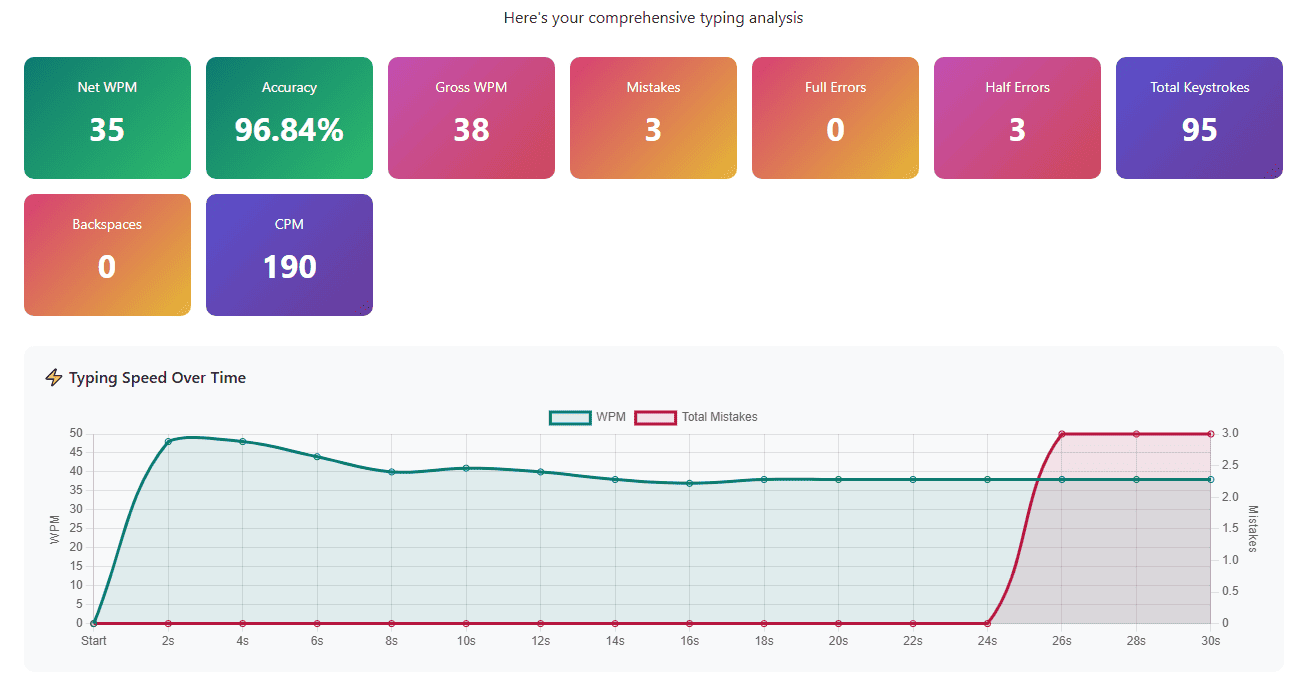
Performance Summary Cards
- Net WPM: Your actual typing speed after penalties and other errors. The ONLY number that you should be focusing on.
- Accuracy: Your Total accuracy for all characters typed, try for 95%+ accuracy).
- Gross WPM: Words per minute (WPM) without penalties. WPM just from speed; not whether you made any mistakes when you typed them. This shows how fast your fingers move, regardless of mistakes.
- Mistakes: Total number of errors made, including both full and half errors.
- Full Errors: The count of major mistakes that significantly impacted your score.
- Half Errors: Minor mistakes that had smaller penalties.
- Total Keystrokes: Every key you pressed, including letters, spaces, and corrections.
- Backspaces: How many times you press backspace to corrected yourself.
- CPM (Characters Per Minute): Another standard typing metric, especially useful for data entry jobs.
Speed Over Time Chart
The chart shows how your typing speed has changed over the course of your test. In addition to showing speed over time; this chart will also show you any spikes and drops in terms of your typing speed.
As well, the second line provides additional information regarding the number of errors that occurred over time.
Keys With Final Errors Analysis
This section will showcase the keys or characters that created problems for you in the text you submitted at the end of your test.
- The character that was wrong
- How many times you made this specific mistake
Slowest Keys Analysis
It identifies which characters take you the longest to find and type.
For instance, you might discover that:
- Special characters like ";" or ":" slow you down
- Certain letter combinations are difficult
- Specific punctuation marks require hesitation
Each slow key appears with its average response time in milliseconds. Keys taking over 300-400ms indicate you need more.
Personalized Recommendations
- Based on your performance, the system generates specific advice like "Focus on accuracy first.”
"Try to minimize corrections. " - "Excellent performance! Consider trying the Hard difficulty mode"
- "Your accuracy is outstanding! You can now focus on increasing your typing speed."
Side-by-Side Text Comparison
This detailed analysis shows exactly what happened during your typing test:
Left Panel - Original Text: The paragraph you were supposed to type, with your errors highlighted in context.
Right Panel - Your Typing: What you actually typed, showing every addition, substitution, and mistake.
This visualization is incredibly powerful because you can see exactly where things went wrong.
Frequently Asked Questions
What's a good typing speed for 15 minutes?
The average speed target should be above 50 WPM for professional work with an accuracy of greater than 95%. For government exams, the average target is between 40 and 45 words. Advanced professionals achieve a typing speed of above 60 to 75+ WPM consistently over a 15-minute period.
My speed drops significantly after 10 minutes. What should I do?
This indicates that you have to develop your endurance. Build your endurance gradually with more 10-minute tests before you attempt to increase the duration to 15 minutes. In addition, check your ergonomics and your typing technique to identify any potential fatigue problems.
Which difficulty mode should I use for 15 minutes?
Begin with the easiest difficulty level until you can maintain your target WPM comfortably. Once you achieve 95%+ accuracy on the easiest level, you can begin using the medium-difficulty testing level and save the hardest level for advanced level training.
Will practicing 15 minutes help my 10-minute exam performance?
Definitely! By practicing for longer durations, the shorter exam will become easy; therefore, you will see significant improvements in both speed and confidence for the 10-minute exams as a result of your training at the 15-minute level.
Start Your Typing Exam Preparation Today
The typing test is by far the most valuable tool you have available to practice for the SSC, RRB, bank, and other government exams. This 15 Minute Typing Practice test has been designed to replicate the same time limits, type of results and stress you will feel while taking the actual test so that you are completely ready on test day. By practicing at least once a week, with a focus on your technique, with 15 minutes of typing time, you will be able to confidently perform well during your government typing exam and develop a new career building skill!
About the Author