- 01Ready to Level Up Your Typing? Welcome to Free Typing Practice!
- 02How Do You Use This Typing Practice Tool?
- 03Why Should You Practice Typing for 20 to 30 Minutes?
- 04What Are the Real Benefits of Daily Typing Practice?
- 05What is the correct Typing Speed for you?
- 06Correct position and tactics While Typing
- 07How Are Your Speed and Errors Calculated?
- 08Frequently Asked Questions
- 09Ready to Start? Jump In and Practice Now!
Ready to Level Up Your Typing? Welcome to Free Typing Practice!
Hello User, Welcome to FreeTypingTest.in. If you want to practice typing, we made this platform for you.
Typing practice is an important part of improving your WPM and typing skills. We built this typing practice tool and practice guide to help you. No matter whether you are a student preparing for a typing skills test, a professional who wants to improve WPM to increase productivity, or you are preparing for the government typing test, bookmark this page on your browser for daily English typing practice.
Typing practice is completely free, no need to log in or create an account.
How Do You Use This Typing Practice Tool?
Using our typing platform for practice is very easy. follow these points
Choose Practice Duration
There is a dropdown menu to set the typing practice time. It also has a custom timing option for your exams, such as the SSC CGL typing skill test, which requires a 15-minute typing test.
Select Difficulty Level & Paragraph
We give users the option to select the difficulty level. Here are easy, medium, and hard three difficulty levels you can select according to your preference
There are 100+ paragraphs in each difficult mode. You can choose any paragraph for typing practice.
Toggle Between Practice Mode and Exam Mode
We built two practice modes for you. I know some of you want to type with the word highlight, while others want to type without it. If you want to test yourself, choose the exam mode to replicate the actual typing exam.
Turn On Fullscreen View
You can see the full-screen option in the test setting. I recommend you use that so that your focus is only on the practice.
Step 5: Check Your Performance and download the report
After the test finishes or if you submit the practice early, you will see the detailed typing report. This report includes your Net WPM, Gross WPM, Accuracy, and Error counts, live speed graph over time, and a side-by-side comparison showing every mistake.
To download your current report, just enter the name and click on generate the report.
Why Should You Practice Typing for 20 to 30 Minutes?
If you're writing an essay or taking an official government typing test, you need to type continuously for 10, 15, or 30 minutes with accuracy.
Practice for a long duration will help in improving finger fatigue. This will improve the drop in wpm during the test.
Doing regular 30-minute typing practice sessions and using custom timers from 1 to 30 minutes builds solid muscle memory and hand endurance. This ensures your speed stays fast and your accuracy stays high from start to finish!
What Are the Real Benefits of Daily Typing Practice?
- Save hours of time every single week because of your fast typing habit. After the typing practice, you can easily hit the 60 to WPM, and more. This will help you to finish your assignment email and your work in less time.
- If you are constantly looking at the keyboard and the screen, you are breaking your focus. Your brain is continuously looking for the keyboard keys. Through practice, you can improve your finger muscle memory.
- If you practice for the government typing exams, it helps you to increase your accuracy. You can select the custom typing time for practice according to your exam.
- Practice will help you reduce mistakes. With practice, the need to press the backspace will decrease over time. Keep targeting for an accuracy of more than 95%.
What is the correct Typing Speed for you?
If you are thinking about what typing speed you must achieve, this table will help you to understand that.
| Target Role / Category | Recommended Speed | Target Accuracy |
|---|---|---|
| Beginner | 20 – 30 WPM | 90% – 95% |
| Students & Office Workers | 35 – 45 WPM | 95%+ |
| SSC CGL DEST / CHSL Candidates | 35 – 40+ WPM | 95% – 98% |
| Content Writers & Coders | 50 – 70 WPM | 97%+ |
| Data Entry & Court Typists | 70 – 90+ WPM | 98% – 99% |
Correct position and tactics While Typing
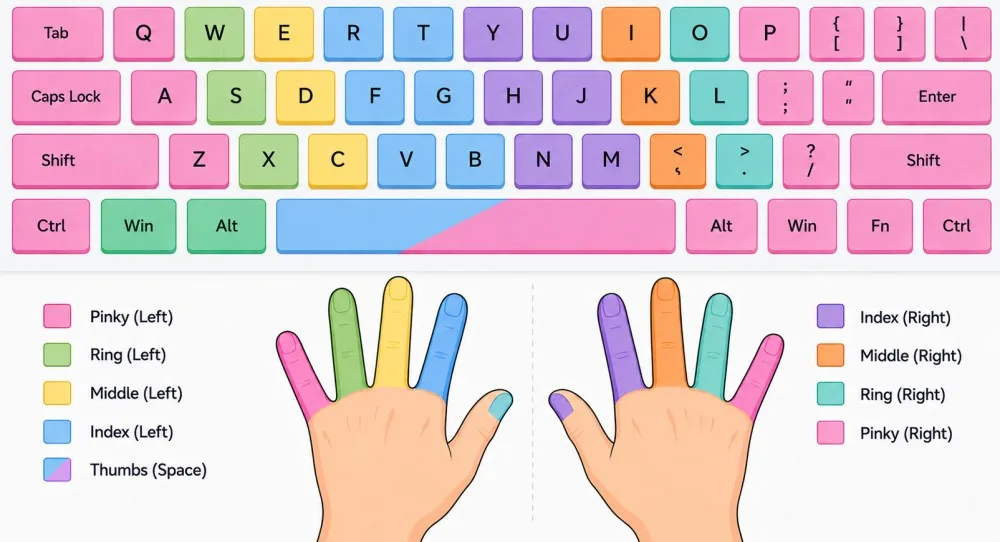
If you are not practicing with the correct position, then you might feel pain in your wrist and fingers. I recommend you keep your Back straight and have some support against the chair, this will help you with back pain. Make sure both feet are on the flat floor. Keep your elbow at a 90-degree angle. If you hit the keys too hard, it will cause finger pain. Modern keyboards are soft to save ur energy. The monitor must be at eye level so you do not have to strain your neck. Take breaks between typing. My personal recommendation is to try a 20-minute test with a 20-minute rest.
How Are Your Speed and Errors Calculated?
You must know how our tool calculates the WPM and error of your typing-
Gross WPM vs. Net WPM
Gross WPM is your raw typing speed. In standard typing tests, 5 characters count as one word. The formula is:
Gross WPM = (Total Keystrokes / 5) / Time (in Minutes)
Net WPM is your real, usable speed after deducting uncorrected errors. This is the score that actually matters!
Net WPM = Gross WPM - (Uncorrected Mistakes / Time in Minutes)
Full Errors vs. Half Errors
In competitive exams like SSC CGL DEST, mistakes are divided into two types:
- Full Errors: Skipping a word, typing the wrong word, or adding an extra word.
- Half Errors: Capitalization mistakes, minor punctuation errors, or adding extra spaces.
Our results page highlights all these errors in different colors, so you know exactly what to improve!
Frequently Asked Questions
Is this online typing practice tool 100% free?
Yes, absolutely 100% free, and no login is required at our free typing test platform.
Can I set custom practice timings like 3, 7, or 25 minutes?
Yes! Just click the Practice Time dropdown and select Custom. After that, enter the timing you want in minutes.
What speed should I aim for as a beginner?
Aim for 35 WPM with 95% accuracy first. Once you hit that baseline, push for 50+ WPM!
Why is 30-minute practice better for exams?
Exams cause stress and hand fatigue. Training for 30 minutes makes official 10 or 15-minute exams feel short, easy, and totally stress-free.
Ready to Start? Jump In and Practice Now!
You're all set! Scroll up to the typing box, pick your practice time from 1 to 30 minutes, select a paragraph, and hit start!
About the Author