Why our 3-minute Typing Test is Best & Unique
Welcome to the 3-minute typing test, with 100+ practice paragraphs. This typing test practice will help you to improve your speed in 30 dayswith a detailed analysis report.
We provide a typing report with Performance Summary Cards that contain Net WPM, Accuracy, Gross WPM, Mistakes, Full Errors, Half Errors, Total Keystrokes, Backspaces, CPM (Characters Per Minute), Speed Over Time Chart, Slowest Keys Analysis, Personalized Recommendations, and Side-by-Side Text Comparison. This makes this platform unique and useful for professional typing skill assessment and touch typing technique practice.
How to Participate in This Typing Test
Settings: You will have complete control over your typing test environment before starting.
Levels of Difficulty
You can choose from three different difficulty levels: easy, medium, or hard, based upon your level of proficiency.
Paragraph Selection
We provide 100+ paragraphs in each difficulty mode. You can select a random paragraph or a specific paragraph number if you wish to practice that same text repeatedly.
Sound Feedback
You can toggle sound feedback on or off. When enabled, it provides an auditory click sound for every key pressed, assisting you in keeping a rhythmic pace.
Typing Box Layout
Toggle the separate typing box layout depending on your personal preference. You can choose to type directly within the highlighted text box or use a separate dedicated typing input area.
Real-Time Stats Displayed
During the typing test, five key metrics are shown at the top of your screen:
Countdown Timer
When you have approximately 10 seconds remaining in your test, the countdown timer will change to red, and begins to pulse to remind you to finish strong.
WPM (Words Per Minute)
Your current Words Per Minute speed, so you can see you're typing speeding live.
Accuracy
The accuracy rating indicates your accuracy in terms of percentage. If you see this number decrease, you may want to slow down and concentrate on typing accurately.
Backspace Count
The total number of times you have used the backspace key to correct your errors.
Understand Your Detailed Performance Report
This is where out platform truly shines. Once you have finished or submitted the typing test, you will then automatically receive a full, in-depth analysis of your performance that most free typing tests don't provide.
Performance Summary Cards
- Net WPM: Your actual typing speed after penalties and other errors. The ONLY number that you should be focusing on.
- Accuracy: Your Total accuracy for all characters typed, try for 95%+ accuracy).
- Gross WPM: Words per minute (WPM) without penalties. WPM just from speed; not whether you made any mistakes when you typed them. This shows how fast your fingers move, regardless of mistakes.
- Mistakes: Total number of errors made, including both full and half errors.
- Full Errors: The count of major mistakes that significantly impacted your score.
- Half Errors: Minor mistakes that had smaller penalties.
- Total Keystrokes: Every key you pressed, including letters, spaces, and corrections.
- Backspaces: How many times you press backspace to corrected yourself.
- CPM (Characters Per Minute): Another standard typing metric, especially useful for data entry jobs.
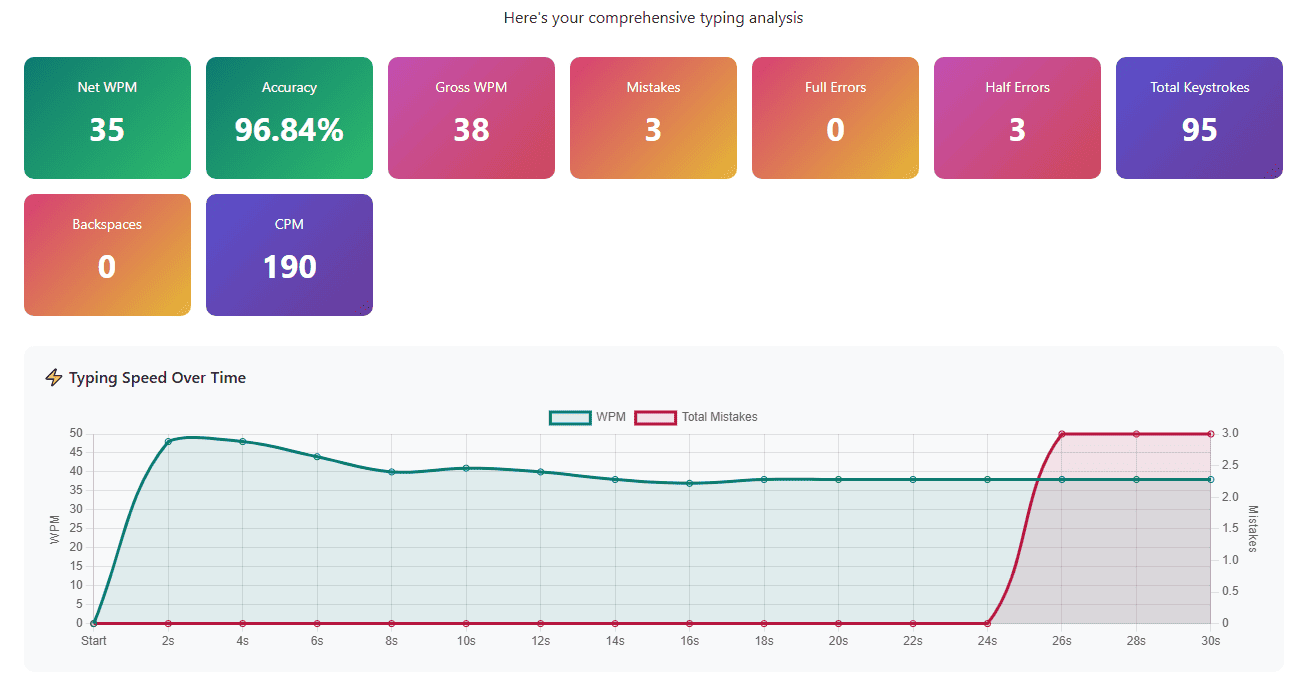
Speed Over Time Chart
The chart shows how your typing speed has changed over the course of your test. In addition to showing speed over time; this chart will also show you any spikes and drops in terms of your typing speed.
As well, the second line provides additional information regarding the number of errors that occurred over time.
Keys With Final Errors Analysis
This section will showcase the keys or characters that created problems for you in the text you submitted at the end of your test.
- The character that was wrong
- How many times you made this specific mistake
Slowest Keys Analysis
It identifies which characters take you the longest to find and type.
For instance, you might discover that:
- Special characters like ";" or ":" slow you down
- Certain letter combinations are difficult
- Specific punctuation marks require hesitation
Each slow key appears with its average response time in milliseconds. Keys taking over 300-400ms indicate you need more.
Personalized Recommendations
- Based on your performance, the system generates specific advice like "Focus on accuracy first.”
"Try to minimize corrections. " - "Excellent performance! Consider trying the Hard difficulty mode"
- "Your accuracy is outstanding! You can now focus on increasing your typing speed."
Side-by-Side Text Comparison
This detailed analysis shows exactly what happened during your typing test:
Left Panel - Original Text: The paragraph you were supposed to type, with your errors highlighted in context.
Right Panel - Your Typing: What you actually typed, showing every addition, substitution, and mistake.
This visualization is incredibly powerful because you can see exactly where things went wrong.
Frequently Asked Questions
- Is 35 WPM easy to achieve?
If you proper practice daily, you should be able to typing at a minimum of 35 Words per Minute in two to three months. It's very attainable but requires consistent effort and correct technique.
- How many words should I type in 3 minutes?
At 35 WPM, you need approximately 105 words in 3 minutes. At 40 WPM, approximately 120 words. Focus on Net WPM (speed after deducting errors), not just total words typed.
- How many times should I practice 3-minute tests daily?
Take 5-10 full 3-minute tests daily. Quality focused practice beats excessive repetition.
Start Your Typing Preparation Today
Take our free 3 minute typing test now to discover your true sustainable typing speed. The 3-minute duration provides the perfect balance of meaningful endurance testing and practical session length.
By practicing at least once a week, with a focus on your technique, with 3 minutes of typing time, you will be able to confidently perform well during your government typing exam (such as the RRB NTPC Typing Testdetailed in our RRB NTPC guideand on the official Indian Railways Portal). Progress to our 5-minute typing testor 10-minute typing testto build exam-level stamina!
About the Author