Welcome to the 1-minute typing test, with 100+ practice paragraphs. This is the fastest and convenient way to measure your typing speed, accuracy, and overall keyboard proficiency. Our typing test will helps you to improve your speed with a detailed analysis report.
Why our 1-minute Typing Test is Best & Unique
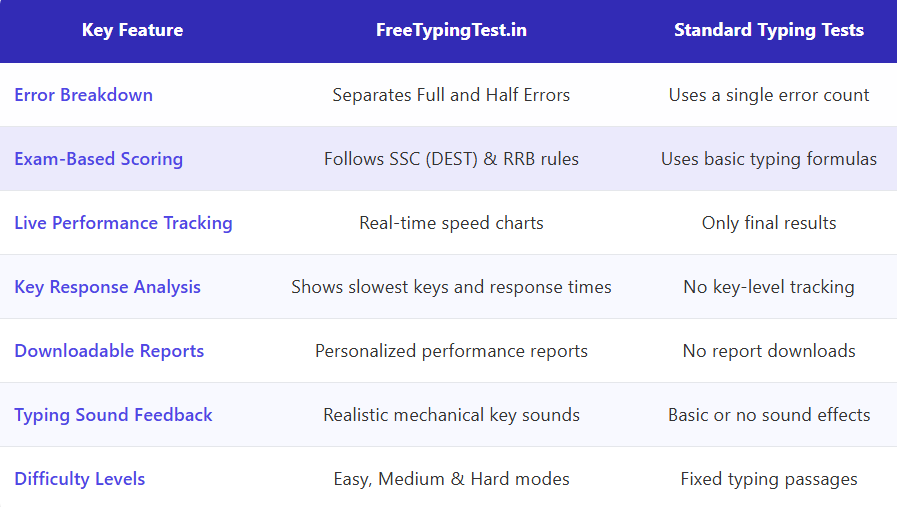
If you are just starting your typing journey you have to evaluate and improve your typing skills. 1 minute test is so quick you can check you speed anytime. Most typing tests simply show you a WPM number. This freetypingtest.in platform goes far beyond, You Performance Summary Cards contain Net WPM, Accuracy, Gross WPM, Mistakes, Full Errors, Half Errors, Total Keystrokes, Backspaces, CPM (Characters Per Minute), Speed Over Time Chart, Slowest Keys Analysis, Personalized Recommendations and Side-by-Side Text Comparison, This makes this platform unique and useful for professional typing skill assessment and government typing exam preparation.
How to Participate in This Typing Test
Settings, You will have complete control over your typing test.
Levels of Difficulty
You can choose from three different difficulty levels: easy, medium, or hard, based upon your level of proficiency.
Paragraph Selection
We provide 100+ paragraph in each difficulty mode, You can select a random paragraph or a specific paragraph number if you wish to practice that same paragraph.
Highlight Toggle
As you type, you will see the system highlight your text against the background in real-time. Green will signify that your input is correct, while red will show you have made an error. You can simply toggle the highlight feature off/on depending on your personal preferences.
Exam Mode
Exam Mode uses the identical scoring method from actual governmental exams, such as SSC or CPCT, therefore, this is a great exercise to prepare for your upcoming typing exam. The regular mode uses standard typing test calculations, so you can practice both ways.
Real-Time Stats Displayed
During the typing test, five key metrics are shown at the top of your screen:
Countdown Timer
When you have approximately 10 seconds remaining in your test, the countdown timer will change to red, and begins to pulse to remind you to finish strong.
WPM (Words Per Minute)
Your current Words Per Minute speed, so you can see you're typing speeding live.
Accuracy
The accuracy rating indicates your accuracy in terms of percentage. If you see this number decrease, you may want to slow down and concentrate on typing accurately.
Backspace Count
The total number of times you have used the backspace key to correct your errors.
Understand Your Detailed Performance Report
This is where out platform truly shines. Once you have finished or submitted the typing test, you will then automatically receive a full, in-depth analysis of your performance that most free typing tests don't provide.
Performance Summary Cards
- Net WPM: Your actual typing speed after penalties and other errors. The ONLY number that you should be focusing on.
- Accuracy: Your Total accuracy for all characters typed, try for 95%+ accuracy).
- Gross WPM: Words per minute (WPM) without penalties. WPM just from speed; not whether you made any mistakes when you typed them. This shows how fast your fingers move, regardless of mistakes.
- Mistakes: Total number of errors made, including both full and half errors.
- Full Errors: The count of major mistakes that significantly impacted your score.
- Half Errors: Minor mistakes that had smaller penalties.
- Total Keystrokes: Every key you pressed, including letters, spaces, and corrections.
- Backspaces: How many times you press backspace to corrected yourself.
- CPM (Characters Per Minute): Another standard typing metric, especially useful for data entry jobs.

Speed Over Time Chart
The chart shows how your typing speed has changed over the course of your test. In addition to showing speed over time; this chart will also show you any spikes and drops in terms of your typing speed.
As well, the second line provides additional information regarding the number of errors that occurred over time.
Keys With Final Errors Analysis
This section will showcase the keys or characters that created problems for you in the text you submitted at the end of your test.
- The character that was wrong
- How many times you made this specific mistake
Slowest Keys Analysis
It identifies which characters take you the longest to find and type.
For instance, you might discover that:
- Special characters like ";" or ":" slow you down
- Certain letter combinations are difficult
- Specific punctuation marks require hesitation
Keys taking over 300-400ms indicate you need more practice.
Personalized Recommendations
- Based on your typing performance, the our system generates specific advice like "Focus on accuracy first.”
"Try to minimize corrections. " - "Excellent performance! Consider trying the Hard difficulty mode"
Side-by-Side Text Comparison
We also provide the detailed analysis shows exactly what happened during your typing test:
Left Panel - Original Text: The paragraph you were supposed to type, with your errors highlighted in context.
Right Panel - Your Typing: What you actually typed, showing every addition, substitution, and mistake.
This visualization is incredibly powerful because you can see exactly where things went wrong.
How to Use This Platform Effectively
For Beginners
- Start with Easy mode and Highlight ON
- Don't worry about speed initially - focus accuracy first
- Review the "Keys With Final Errors" section after each test
For Intermediate Typists
- Use Medium mode and aim for 40+ WPM with 95% accuracy
- Study your "Speed Over Time" chart to identify pacing issues
- Check the "Slowest Keys" analysis and practice those characters
- Try to reduce your backspace count by looking at the screen, not the keyboard
For Advanced Typists
- Challenge yourself with Hard mode
- Enable Exam Mode if preparing for government tests
- Focus on consistency - try to maintain steady WPM throughout the test
- Use the side-by-side comparison to perfect punctuation and capitalization
For Exam Preparation
- Always use Exam Mode for realistic scoring
- Take multiple tests and track your improvement over time
- Focus on accuracy first - one error can cost several WPM points in government scoring
- Practice with the same difficulty level as your actual exam
Typing Speed Benchmarks
Level | WPM (Easy) | WPM (Medium) | WPM (Hard) |
Beginner | 20-30 | 15-25 | 10-20 |
Average | 40-50 | 35-45 | 30-40 |
Professional | 60-80 | 50-70 | 45-60 |
Expert | 90+ | 80+ | 70+ |
Government Exam Target: 35-40 Net WPM with 95%+ accuracy on Medium difficulty.
Pro Tips for Maximum Improvement
- Choose appropriate difficulty- Start Easy, progress as accuracy reaches 95%+
- Minimize backspaces- Fewer corrections=higher Net WPM
- Focus on slow/error keys- Practice specific problematic characters
- Test daily at same time- Track consistent improvement trends
- Use proper posture- Home row position (ASDF JKL;)
- No keyboard peeking- Builds true touch typing speed
Frequently Asked Questions
- Is 35 WPM easy to achieve?
If you do proper practice daily, you should be able to typing at a minimum of 35 Words per Minute in two to three months. It's very attainable but requires consistent effort and correct technique.
- How many words should I type in 1 minute?
At 35 WPM, you need approximately 35 words in 1 minute. At 40 WPM, approximately 40 words. Focus on Net WPM (speed after deducting errors), not just total words typed.
- Doesaccuracy matter in SSC typing test?
YES, all SSC exams are scored using NET WPM, therefore if you have errors, they will automatically reduce your NET WPM below the passing threshold. Therefore, accuracy is CRUCIAL to your success.
- Can I use backspace in government typing exams?
You will be able to use the backspace key for corrections during some government typing exams. However, excessive use of the backspace key can waste an enormous amount of time.
- How many times should I practice 1-minute tests daily?
Take 5-10 full 1-minute tests daily. Quality focused practice beats excessive repetition.
Start Your Government Exam Preparation Today
The typing test is by far the most valuable tool you have available to practice for the SSC, RRB, bank, and other government exams. This 1 Minute Typing Practice test has been designed to replicate the same time limits, type of results and stress you will feel while taking the actual test so that you are completely ready on test day. By practicing at least once a week, with a focus on your technique, with 1 minute of typing time, you will be able to confidently perform well during your government typing exam and develop a new career building skill!