Why our 30-minute Typing Test is Best & Unique
We provide the 30-minute typing test, with 100+ practice paragraphs in each deficulty level. This 30 minute marathan typing test is made for advanced typists, professional transcriptionists, and the person who wants to know their true typing ability without exhaustion.
Most typing tests simply show you a WPM number. This freetypingtest.in platform goes far beyond. Your Performance Summary Cards contain Net WPM, Accuracy, Gross WPM, Mistakes, Full Errors, Half Errors, Total Keystrokes, Backspaces, CPM (Characters Per Minute), Speed Over Time Chart, Slowest Keys Analysis, Personalized Recommendations, and Side-by-Side Text Comparison. This makes this platform unique and useful for professional typing skill assessment and government typing exam preparation as outlined on the Staff Selection Commission (SSC) official website.
How to Participate in This Typing Test
Settings: You will have complete control over your typing test environment before starting.
Levels of Difficulty
You can choose from three different difficulty levels: easy, medium, or hard, based upon your level of proficiency.
Paragraph Selection
We provide 100+ paragraphs in each difficulty mode. You can select a random paragraph or a specific paragraph number if you wish to practice that same text repeatedly.
Sound Feedback
You can toggle sound feedback on or off. When enabled, it provides an auditory click sound for every key pressed, assisting you in keeping a rhythmic pace.
Typing Box Layout
Toggle the separate typing box layout depending on your personal preference. You can choose to type directly within the highlighted text box or use a separate dedicated typing input area.
Real-Time Stats Displayed
During the typing test, five key metrics are shown at the top of your screen:
Countdown Timer
When you have approximately 10 seconds remaining in your test, the countdown timer will change to red, and begins to pulse to remind you to finish strong.
WPM (Words Per Minute)
Your current Words Per Minute speed, so you can see you're typing speeding live.
Accuracy
The accuracy rating indicates your accuracy in terms of percentage. If you see this number decrease, you may want to slow down and concentrate on typing accurately.
Backspace Count
The total number of times you have used the backspace key to correct your errors.
Tips for Your First 30 Minute Typing Test
Build Your Endurance
Don't try to type a full 30 minute test without warming-up first! Typing endurance (the ability to sustain your pace over a long period of time) increases gradually by using shorter 5-minute, 10-minute, and 15-minutetests. This will help to build enough endurance for your 30-minute marathon typing.
Set Up Your Workstation
Working with good ergonomics when completing a 30-minute typing test is imperative. Learn key posture tips in our touch typing guideand follow our 30-day typing practice planfor maximum comfort.
Warm Up Before the Test
Use a 1-minute typing testor 2-minute typing testbefore you do your 30-minute test to get your fingers ready to type and to get blood flowing to your fingers without developing fatigue prior to taking your test.
Stay Hydrated
Make sure you keep water nearby while you take your 30-minute typing test because being dehydrated may lead to a lack of concentration and poor fine motor control. If you take a sip of water before you start the 30-minute typing test, do not stop to drink water during the test.
Timing is Everything
Take your 30-minute typing test when you are mentally and physically fresh. Most people do best when taking the test in the morning or early afternoon. Try to avoid taking the test when you are tired or stressed.
Minimize Distractions
In order to type for 30 minutes, you have to stay very focused on typing. Make sure to turn-off notifications, close any windows and tabs that you do not need for the typing test, inform people who may disturb you not to bother you while you are taking the test, and to have a quiet environment so you can concentrate while you are taking the typing test.
Understand Your Detailed Performance Report
This is where out platform truly shines. Once you have finished or submitted the typing test, you will then automatically receive a full, in-depth analysis of your performance that most free typing tests don't provide.
Performance Summary Cards
- Net WPM: Your actual typing speed after penalties and other errors. The ONLY number that you should be focusing on.
- Accuracy: Your Total accuracy for all characters typed, try for 95%+ accuracy).
- Gross WPM: Words per minute (WPM) without penalties. WPM just from speed; not whether you made any mistakes when you typed them. This shows how fast your fingers move, regardless of mistakes.
- Mistakes: Total number of errors made, including both full and half errors.
- Full Errors: The count of major mistakes that significantly impacted your score.
- Half Errors: Minor mistakes that had smaller penalties.
- Total Keystrokes: Every key you pressed, including letters, spaces, and corrections.
- Backspaces: How many times you press backspace to corrected yourself.
- CPM (Characters Per Minute): Another standard typing metric, especially useful for data entry jobs.
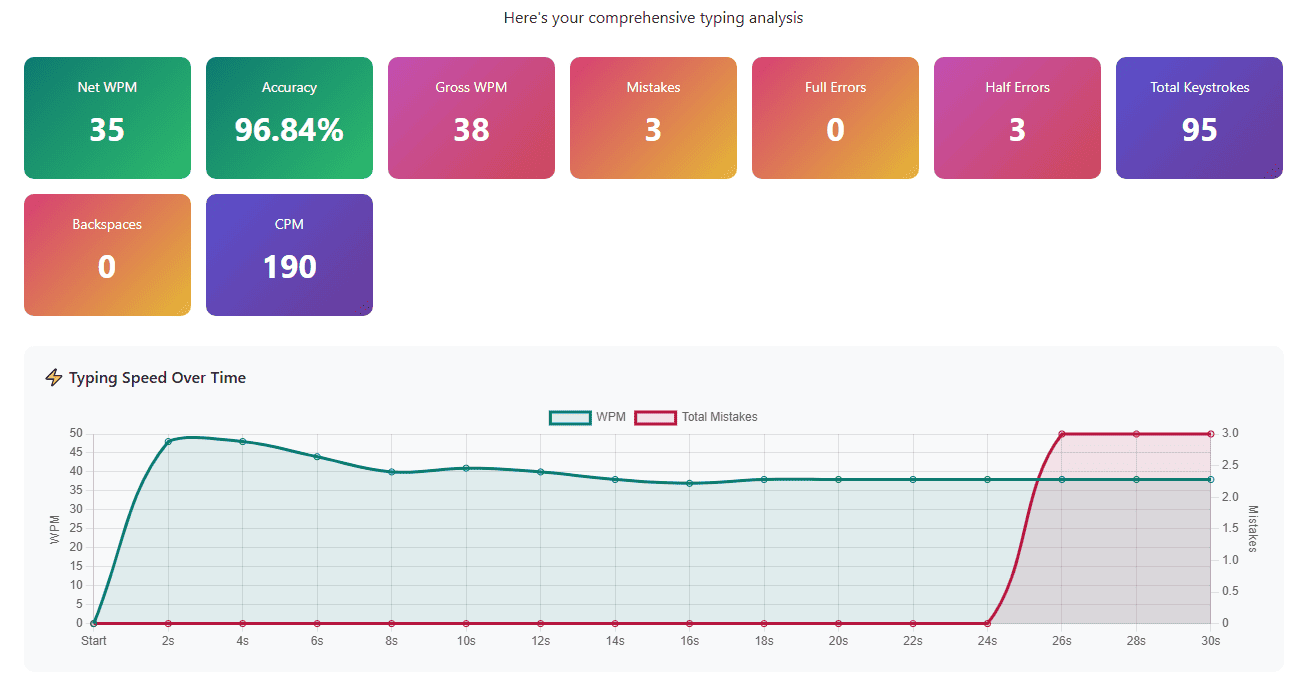
Speed Over Time Chart
The chart shows how your typing speed has changed over the course of your test. In addition to showing speed over time; this chart will also show you any spikes and drops in terms of your typing speed.
As well, the second line provides additional information regarding the number of errors that occurred over time.
Keys With Final Errors Analysis
This section will showcase the keys or characters that created problems for you in the text you submitted at the end of your test.
- The character that was wrong
- How many times you made this specific mistake
Slowest Keys Analysis
It identifies which characters take you the longest to find and type.
For instance, you might discover that:
- Special characters like ";" or ":" slow you down
- Certain letter combinations are difficult
- Specific punctuation marks require hesitation
Each slow key appears with its average response time in milliseconds. Keys taking over 300-400ms indicate you need more.
Personalized Recommendations
- Based on your performance, the system generates specific advice like "Focus on accuracy first.”
"Try to minimize corrections. " - "Excellent performance! Consider trying the Hard difficulty mode"
- "Your accuracy is outstanding! You can now focus on increasing your typing speed."
Side-by-Side Text Comparison
This detailed analysis shows exactly what happened during your typing test:
Left Panel - Original Text: The paragraph you were supposed to type, with your errors highlighted in context.
Right Panel - Your Typing: What you actually typed, showing every addition, substitution, and mistake.
This visualization is incredibly powerful because you can see exactly where things went wrong.
Frequently Asked Questions
- Is 35 WPM easy to achieve?
If you proper practice daily, you should be able to typing at a minimum of 35 Words per Minute in two to three months. It's very attainable but requires consistent effort and correct technique.
- How many words should I type in 30 minutes?
At 35 WPM, you need approximately 1050 words in 30 minutes. At 40 WPM, approximately 1200 words. Focus on Net WPM (speed after deducting errors), not just total words typed.
- How many times should I practice 30-minute tests daily?
Take 1-2 full 30-minute tests daily. Quality focused practice beats excessive repetition.
Start Your Typing Test Preparation Today
The 30-minute typing examination represents the highest level of typing stamina evaluation. The 30-minute typing test checks your capacity to maintain performance over an extended period, and develops the mental and physical stamina required for professional typing. By practicing at least once a week, with a focus on your technique, for 30 minutes of typing time, you will be able to confidently perform well during your government typing exam and your professional life.
About the Author